AVRDUDESS is a GUI for AVRDUDE, a tool for programming Atmel microcontrollers.
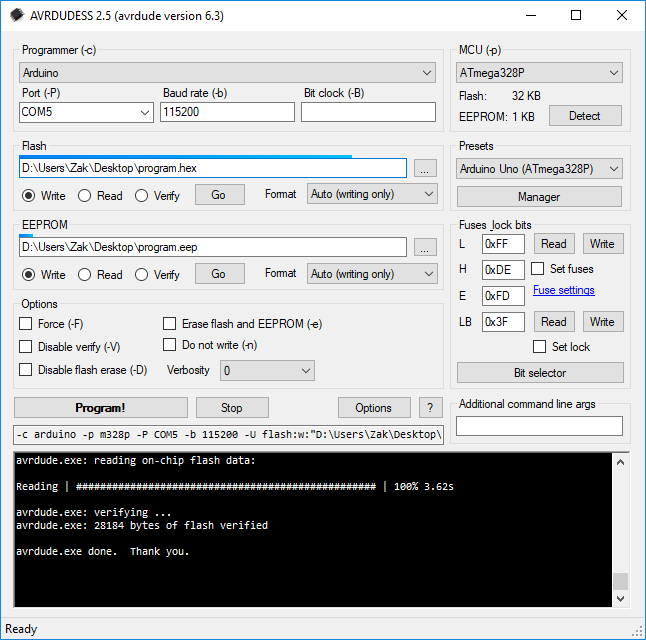
Some key features:
- Supports all programmers and MCUs that AVRDUDE supports
- Supports presets, allowing you to change between devices and configurations quickly and easily
- Drag and drop files for easy uploading
- Automatically lists available COM ports
- Cross-platform with the use of Mono for Linux & macOS


Downloads
LATEST | AVRDUDESS-2.13-setup.exe (1.95 MB) AVRDUDESS 2.13 (Installer for Windows Vista and newer) Downloaded 58116 times MD5: FC1C306CCA78D5FB3A1058F35EA44A46 |
LATEST | AVRDUDESS-2.13-portable.zip (596.72 KB) AVRDUDESS 2.13 (Portable for any OS) Downloaded 23736 times MD5: 42A5DD458425F18F82C82AE30A4D5934 |
Source available on GitHub
Requirements
Windows
Requires .NET Framework 2.0 SP1 or newer. All systems since Windows Vista will have the required version already installed.
Linux & macOS
Can be ran using Mono.
Has not been tested on macOS, but should work. Might need the --arch=32 argument.mono --arch=32 avrdudess.exe
Installing on Ubuntu 18.04
Install Mono (this is the minimum required, you can use mono-complete for a full install):sudo apt-get install libmono-system-windows-forms4.0-cil
On older versions of Ubuntu you might need to use libmono-winforms2.0-cil instead.
Install AVRDUDE and AVR-GCC (for avr-size):sudo apt-get install avrdude gcc-avr
Run AVRDUDESS with mono, you might have to run as root (sudo) so that AVRDUDE can access ports if you haven’t changed any permissions or rules.d stuff:mono avrdudess.exe

493 comments
40 pings
Skip to comment form
Zak,
I’m getting this error when i launch Avrdudess.exe on windows 7 Pro. It used to work fine up until recently. I tried both the installer and portable version still the same error. I tried disabled the AV still not working. I also tried another pc and it loads fine any idea why it doesn’t work on this computer anymore? Thanks
ERROR: avrdude is missing!
>>>: avrdude
Author
Hi Dave, in options make sure the avrdude location is blank so it tries to find it automatically. If it’s already blank then try setting it to the install location of avrdudess.
Thank you, I empty that field an it works now.
Hey Zak,
Is there a way to encrypt a hex file or an arduino code and upload it. Handy when sharing files but not the code itself.
Author
Hi George, hex files don’t contain your original code, but compiled code (in Intel Hex format). It can be disassembled, but then you end up with assembly code. If you really want to encrypt your stuff then you’ll need a bootloader that can decrypt it when uploading to the Arduino, like this one https://github.com/sirgal/AVR-EAX-AES-bootloader
Make sure to set the lock bits so that the decrypted code can’t be read from the flash afterwards.
I just ran into a problem I don’t remember having before. I can load an Nano with the ch340 chip from the arduino ide, but it hangs in Avrdudess ver 2.12. Does avrdudess recognize the port with the ch340? I don’t remember if I loaded a nano this way before.
Author
The CH340 shows as a standard serial port so there shouldn’t be any issues there. Are you able to press stop when it hangs, and does it show anything in the console output?
Is there a way to load a preset automatically when it starts? I had set it up like this before, but I can’t remember how I did it. I don’t mean the “Load previous settings” Option. The presets always start with default and not with the last used preset.
Author
Hey Micha, you can specify the preset to as the first command line argument –
C:/path/to/avrdudess.exe "Your Preset Name"Hi Zak. Thank you for your answer. But unfortunately I still don’t understand exactly how to do it. I created a preset for my USBasp programmer at Preset Manager. But every time I open avrdudess again, the preset is back to default. I can select my preset for my USBasp in the list, but I want it to be activated automatically when avrdudess starts. I’ve already looked in … \ AppData \ Roaming \ AVRDUDESS \ config (and) \ presets, but I can’t find a way to change it.
Author
In older versions it would load your previously loaded preset (which would wipe any changes you did after loading the preset), but in newer versions it loads all of the previous settings instead (hex file, fuse settings, which options were ticked etc). Preset is set to Default, however it isn’t actually loading the Default preset (I should maybe set the preset box to a blank name). The best way to specify a preset to load when opening would probably be to create a new shortcut to avrdudess.exe, right click it and go to properties then at the end of the Target box add a space then the name of your preset in quote marks.
Hi Zak
The GUI is not showing up,but still exist in process list.
I have installed the AVRDUDESS portable on a new win10 and it showed the GUI OK.
I have changed the avrdude path to the arduino location.
And after restart The GUI is not showing up,but exist in process list.
I have tried also the installer version of AVRDUDESS but no change.GUI does not appear anymore.
What is the solution?
Author
Hi Eitan, looks like you’ve found a bug! If AVRDUDESS can’t find avrdude.exe then it won’t be able to start up (arduino avrdude.exe is in
arduino-x.x.x\hardware\tools\avr\bin, though AVRDUDESS already comes with its own avrdude.exe and .conf).The easiest way to fix this is to go to
C:\Users\USERNAME\AppData\Roaming\AVRDUDESSand delete config.xml.Thanks Zak
It worked like a charm.
In the portable version, Why not putting the config.xml file in the same directory of the AVRDUDESS?
Best Regards
Eitan
Author
Awesome 😀 Yea I forgot about making the portable version read from its own directory instead of the user data folders. That will be fixed in the next release.
Hi Zak,
I got “ERROR: Update check failed: Error: SecureChannelFailure (The authentication or decryption has failed.)” while I open the avrdudess application.
I tried to find a solution in google but unfortunately couldn’t find a proper solution for that.
Can you give me a solution? please..
Author
This is usually caused by using an old operating system (like Windows XP) that does not support the newer encryption methods used by the web server.
Hi Zak
After installing mono (MonoFramework-MDK-6.12.0.107.macos10) and avrdudess 2.13 version on macOs 10.11, and print in the terminal:
mono –arch=32 /Applications/avrdudess-2.13/avrdudess.exe (the –arch=32 argument was mandatory otherwise it caused a big native failure)
I get:
WARNING: The runtime version supported by this application is unavailable.
Using default runtime: v4.0.30319
However the avrdudess window is displayed after 3 min and looks OK, but i haven’t tried yet to upload
what is the runtime lib version it tried to find ?
Thanks
Author
Hey Hugo, it was probably looking for v2.0.50727 as I’ve included it as a supported runtime so the program can run on Windows XP. The warning can be safely ignored.
when trying to identify a TPI device (tiny4-5-9-10..) in DETECT avrdudess adds a -p m8 in the end making it unreadable
but via command line with -p t10 it does recognise
is this configurable in avrdudess so when changing CPU the “detect” will add the corespoding -p XYZ_AVR ??
Author
Hi Plouf, this is a known issue that I’ll be improving at some point. See this: https://github.com/zkemble/AVRDUDESS/issues/26
hm i see
to me eitehr a new button should be added like “verify id” where the above selected MCU will send the correct command (imho relative easy)
or try sequent all protocols (very slow)
Author
I could add a verify ID button then. It will be a separate function from auto-detect as that is not supposed to know what the MCU is which is why it needs to try each protocol. Checking each protocol isn’t slow, avrdude usually exits with an error pretty much instantly.
whatever is easier , i think button is easy enough, i see post for the “problem” last some time so
i think this would help 🙂
personaly i had spend a lot of days to uderstand what going on (i had additional problem with programmer)
and the above propblem was mention only in github, i mean it would help some more ppl 😉
Program is very nice, i haven’t problems yet. I only miss the fusebit editor 🙂
Every time i try to READ Flash from my Arduino Mega, It reads but says FAILED to write to file and also say cannot open file.
I have tried running it in admin mode, and changed the file to some other locations (Desktop, D:\ etc) but it never writes.
I have Windows 10 x64 Installed.
Author
Hey Ajay, post the output log of avrdudess.
hi, try to work atxmega128a1 – dont see fuses and other with errors.
what to do?
sergei
Author
Hi, AVRDUDESS only supports extended, high and low fuse bytes. Xmega devices don’t have these fuses, though I do plan on adding support for the xmega fuse bytes at some point.
Thank you, Zek! Your sotware is great. My FTDI232 worked fine after selecting ‘Wiring’ and disabling flash erase (-D).
Hey there Zak,
Just an FYI to you: AVRDUDESS will not function under any version of MacOS beyond Mojave 10.13. This is because Apple completely and totally removed any capacity to run 32-bit software of any sort.
I’ve been trying to get this program to run on MacOS Big Sur 11.3.1, and I did keep getting this error:
“WARNING: The runtime version supported by this application is unavailable.
Using default runtime: v4.0.30319
WARNING: The Carbon driver has not been ported to 64bits, and very few parts of Windows.Forms will work properly, or at all”
I’m not sure how big of an ask this would be for you, but is it possible for you to port this program over to a different framework instead of using WinForms?
Author
Heya, well, it would take waayyy too much time to learn and port everything to a different cross-platform framework. Though it looks like Mono might add 64-bit support at some point, scroll right to the bottom and there’s been some new comments in the past few weeks – https://github.com/mono/mono/issues/6701
But I’m not very familiar with Mono and Carbon and all that stuff so they could be going on about something completely unrelated hah.
Hello, Zak!
I use STK200 programmer on LPT1 under WXP SP2
AVRdude 6.3 with your installable GUI reports problems with LPT (all issues with NET Frameworks and GiveIO were solved). At the same time AVRdude with alternative GUI works OK with this programmer (as well Ponyprog does). I need AVRdudess because it is anounced to be compatible with all chips supported by current version of the AVRdude (I need to read/write Xmega32D4. Please suggest some steps to fix it.
Author
Hey Alex, what exactly does the error message say?
Hi!
thanks for your reply 🙂
the exact message is:
>
Unable to detect MCU
avrdude.exe: port name “LPT1” is neither lpt1/2/3 nor valid number
avrdude.exe: can’t open device “LPT1”
avrdude.exe: failed to open parallel port “LPT1”
>
AVRDUDE command prefix is
-c stk200 -p m8 -P LPT1
Also I can send you snaps of the “success message” from AVRPROG with the same port (LPT1), the same chip (Atmega8) and the same programmer (STK200)
Author
Looks like you’re running a very old version where LPT was in uppercase (it should be lowercase lpt), you’ll need to update your AVRDUDESS or manually type lpt1 into the port box. Screenshots can be uploaded here https://imgur.com/
Thank you very much Zak for this very useful software. It is a good companion for programming Arduino with LDmicro. I had to make a video out of it https://youtu.be/rIM_MqW729U.
Hi Zak,
I am trying to run avrdudess using a jtag2updi programmer. I have the correct avrdude.conf file which was written for avrdude6.3 and I overwrote the avrdude.conf file in program files/avrdudess folder.
This command works perfectly using a bat file on its own (not using avrdudess)
avrdude -Cavrdude.conf -c jtag2updi -p t806 -P COM20 -b 115200 -e -U flash:w:2K.hex
the above works and verifies correctly.
Using avrdudess I get this:
avrdude.exe: jtagmkII_initialize(): part ATmega8 has no PDI interface
avrdude.exe: initialization failed, rc=-1
Double check connections and try again, or use -F to override
this check.
avrdude.exe done. Thank you.
I have selected attiny806 as the device in avrdudess and it shows in the command:
-c jtag2updi -p t806 -P COM20 -b 115200
why is avrdudess changing the device to Atmega8?
I prefer to use AVRDudess if possible.
Thanks in Advance!
Author
See this – https://github.com/zkemble/AVRDUDESS/issues/26
Basically, you can’t use the auto-detect feature for MCUs that don’t use the SPI programming interface.
Hi Zak,
Avrdudess does not work with latest version of AVRDUDE (6.4).
It complains about a missing DLL (libhidapi-0.dll) and does not recognize avrdude version.
FYI only 🙂
Best regards!
Joaquim
Author
Oh I hadn’t relized that 6.4 has been released, thats good! You can get the missing .dll from HERE, place the x86 version into the AVRDUDESS directory and rename it to libhidapi-0.dll
Hi Zak,
I really enjoy using your app. It makes dealing with avrdude easy!
Just curious if you will be updating avrdudess to show fuses read for UPDI devices (there are 8 fuses).
avrdude version 6.3 supports UPDI programming.
Thank you
Author
Yes, at some point I will be updating it to support the different fuses, just not sure when yet.
Can I set/configure AVRDUDESS to use AVRDUDE version 7, which supports a programmer type not supported by AVRDUDESS 2.13?
This is the programmer type supported in AVRDUDE version 7 which is not offered in AVRDUDESS 2.13 I currently have installed (on Windows 10):
– SerialUPDI (UPDI devices connected to serial port with few passive parts)
Thank you.
Author
Hi, in options you can set the avrdude exe and conf locations or you can replace the files in the AVRDUDESS install directory.
Hi Zak,
Any chance, that in the future you will support the ATmega4809 (Arduino Every)?
Author
Hey, m4809 support was added in avrdude 6.4 – https://github.com/zkemble/AVRDUDESS/issues/60
Place avrdude.exe and avrdude.conf in the AVRDUESS install directory from the linked downloads.
[…] Saya mengunakan avrdudess, […]
[…] a mikrokontroller programozásával kezdtem. Ehhez egy Arduino-ISP programozót és az Avrdudess programot használtam. A mikrokontrollert egy próbapanel és 6db összekötő vezeték […]
[…] bir kristal veya internal kristali kullanacaksanız kristal değerine uygun sigorta ayarlarını AVRDUDES adlı yazılımla çipinize […]
[…] knapp 10 EUR, das Treiber-Programm „zadig“ der Firma Akeo für den USBasp, das Programm AVRDUDESS und die neue Firmware als *.HEX-Datei (letztere ist „gut versteckt“, den Weg dorthin […]
[…] von Simon, VK3ELH, zum Vorgehen gelesen und meinen USBasp-Programmer angeschlossen hatte (zadig und AVRDUDESS waren bereits installiert), lief alles wie am Schnürchen. Das Flashen dauerte keine 20 Sekunden […]
[…] forums and blogs people were using either Windows or Linux. I was using the software AVRDUDES from https://blog.zakkemble.net/avrdudess-a-gui-for-avrdude/ in particular the portal exe […]
[…] this reason, it does not support some of the newer AVR chips nor the Atmel-ICE. An alternative is avrdudess, which relies on the above mentioned online fuse calculator. The website claims that one can also […]
[…] with these directions and my new found confidence, I fired up AVRDUDESS (which I just recently discovered is a cool GUI for the avrdude program, NEAT) and got to […]
[…] des ATMeg328P-AU habe ich einen USBAsp in Verbindung mit ZADIG (Installationsanleitung hier) und AVRDUDESS („BitBurner“ geht auch) zum Einsatz […]
[…] (Avrdudess) – used to program an […]
[…] Grund unterstützt es weder einige der neueren AVR-Chips noch Atmel-ICE. Eine Alternative ist avrdudess, das sich auf den oben erwähnten Online-Fusebit-Rechner stützt. Die Website behauptet, dass man […]